GitHub: Code Samples / Terrain-Painter
A Bad Pipeline
During the fifth game project at The Game Assembly — the first project where each group built their own game engine — I noticed a terrain pipeline used by our Level Designers that immediately stood out as problematic.
The workflow looked roughly like this:
- Level Designers exported the navmesh from our engine.
- The navmesh was imported into Unreal Engine.
- A landscape was sculpted in Unreal to match the navmesh.
- The generated terrain mesh was exported.
- Graphical Artists imported that mesh back into our engine.
While this pipeline technically worked, it had a major problem: iteration speed.
Any change required repeating several export/import steps across multiple tools. This makes rapid iteration (which is essential during development) extremely slow. The pipeline might work for a finalized terrain, but it is far from ideal when the environment is constantly evolving.
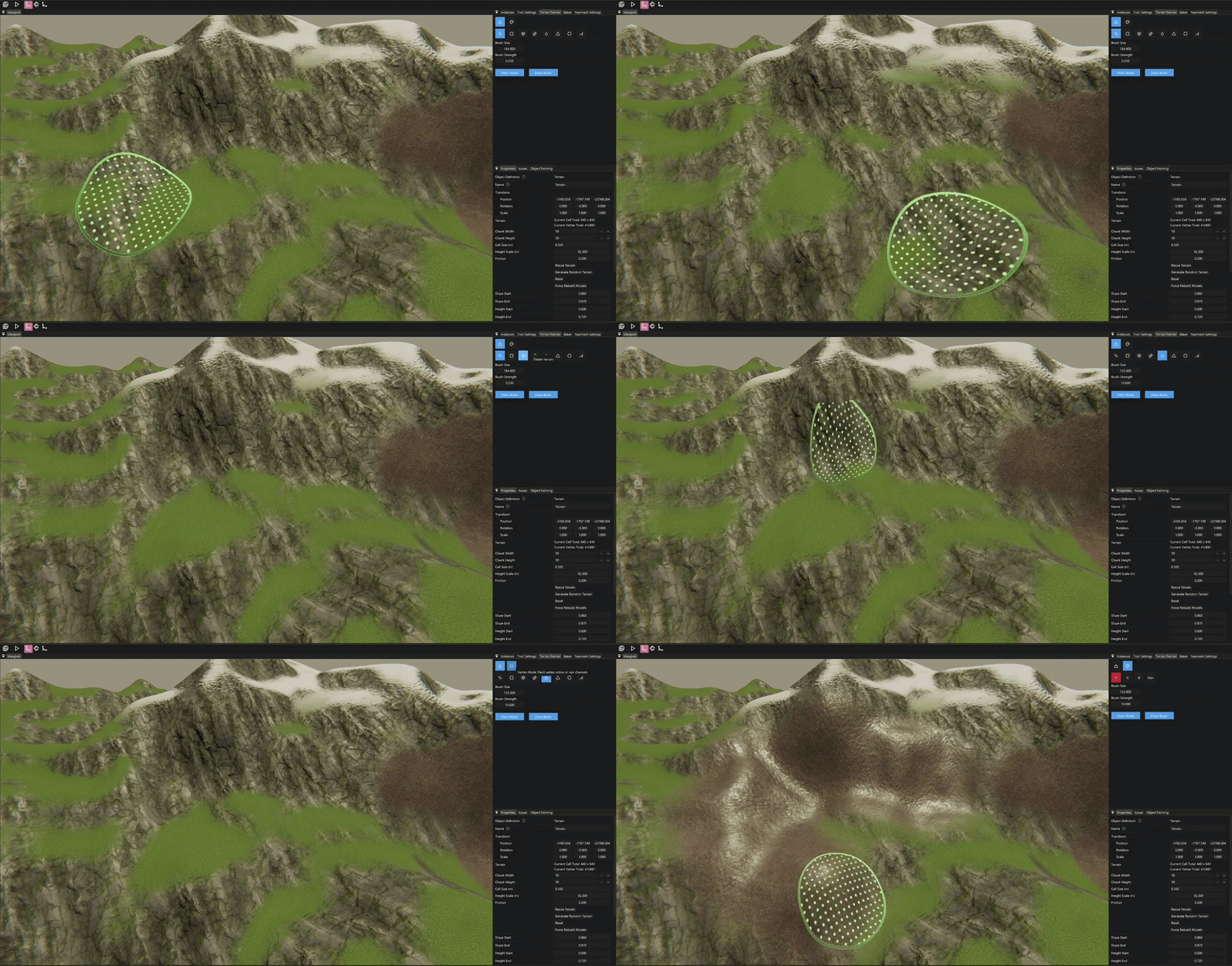
Because of this, I decided to implement a custom terrain painting and landscaping tool directly inside our engine editor.
Terrain systems can become extremely complex, but the most important thing is not complexity — it’s fit for purpose. The goal was to build something that allowed our designers and artists to iterate quickly.
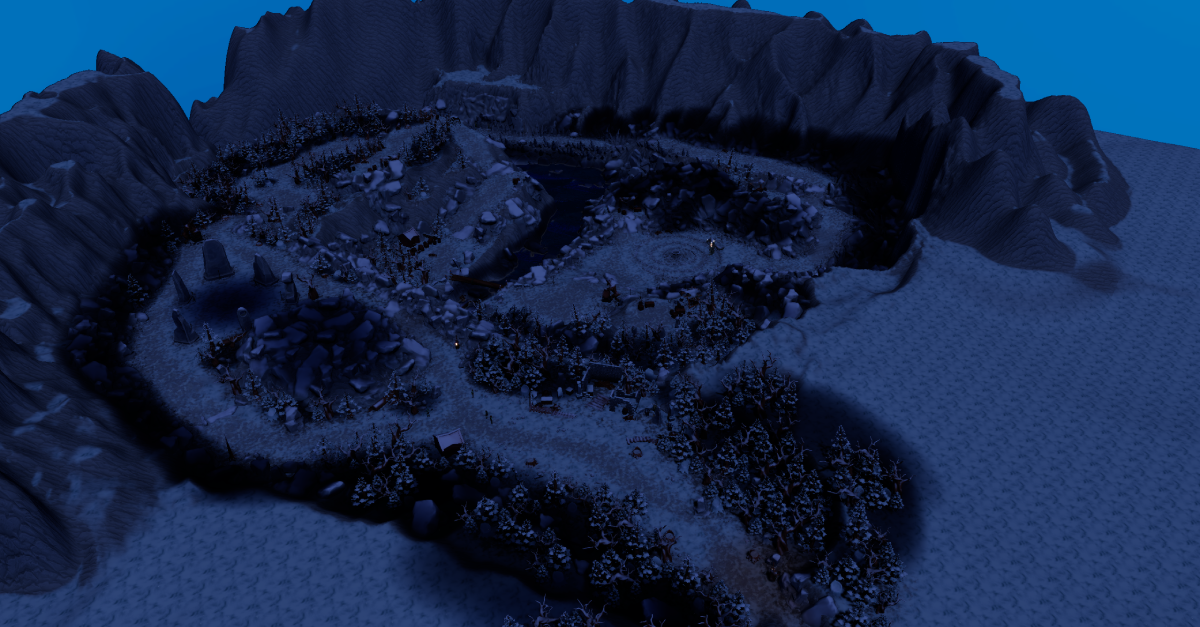
Here is an image from the game Spiteful Hangover which used the terrain painter.
(The dark spots are light influence volumes which determine how areas are affected by ambient and directional light.)
Simple Terrain
The simplest possible terrain representation is a heightmap.
A heightmap stores a single float per grid cell that represents the elevation of the terrain. This approach works well for many games and is very efficient both in memory and rendering.
The main limitation is that heightmaps cannot represent overhangs or caves, since each (x, z) coordinate can only have a single height value.
A minimal terrain representation could therefore look like this:
struct Terrain
{
    std::vector<float> heightmap;
};
In addition to height, we often want to store surface information such as vertex colors. These can later be used for things like:
- texture blending
- material variation
- terrain painting
Extending the terrain structure with vertex colors is straightforward:
struct Terrain
{
    ...
    std::vector<Vector4f> heightmap;
};
Terrain vertex painting is actually much simpler than mesh vertex painting because the grid structure already gives us predictable indexing.
Chunks
If the terrain is small, the simple approach above might be sufficient. However, large terrains quickly become problematic.
A single mesh containing the entire terrain would:
- contain a very large number of vertices
- always need to be rendered entirely
A common solution is to divide the terrain into chunks.
Chunks allow us to:
- render only visible parts of the terrain
- rebuild meshes locally when editing
- support level-of-detail systems
A chunk-based terrain structure might look like this:
struct TerrrainChunk
{
    static constexpr int CHUNK_SIZE{ 64 };
    static constexpr int CELL_COUNT{ CHUNK_SIZE * CHUNK_SIZE };

    std::array<float, CELL_COUNT> heightmap;
	std::array<Vector4f, CELL_COUNT> vertexColors;
    Vector2i chunkCoordinates;
};

struct Terrain
{
    int chunkCountX{ 1 };
	int chunkCountY{ 1 };
    float heightScale{ 1000.f };
	Vector2f cellSize{ 100.f, 100.f };
    std::vector<TerrainChunk> chunks;
};
To simplify access, we can add helper functions that translate global terrain coordinates into chunk-local coordinates.
float Terrain::GetHeight(const int aX, const int aY) const
{
    const int cx{ aX / TerrainChunk::CHUNK_SIZE };
    const int cy{ aY / TerrainChunk::CHUNK_SIZE };
    const int lx{ aX % TerrainChunk::CHUNK_SIZE };
    const int ly{ aY % TerrainChunk::CHUNK_SIZE };
    return chunks[cy * chunkCountX + cx].GetHeight(lx, ly);
}

float TerrainChunk::GetHeight(const int aX, const int aY) const
{
    return heightmap[aY * CHUNK_SIZE + aX];
}
One important detail when working with chunked terrain is edge stitching. When generating the mesh for a chunk, it must sample heights from neighbouring chunks to ensure that:
- normals remain consistent
- UVs align correctly
- no gaps appear between chunks.
Building the Mesh
Another design decision is where chunks exist in space.
In my implementation, chunks are positioned in local space relative to the terrain object. During rendering the chunk transform is multiplied with the terrain transform.
float SampleHeight(const Terrain& aTerrain, int aX, int aZ)
{
	aX = std::clamp(aX, 0, aTerrain.chunkCountX * TerrainChunk::CHUNK_SIZE - 1);
	aZ = std::clamp(aZ, 0, aTerrain.chunkCountY * TerrainChunk::CHUNK_SIZE - 1);
	return aTerrain.GetHeight(aX, aZ) * aTerrain.heightScale;
}
When building the mesh we can also support multiple LOD levels. Lower LODs simply sample the heightmap with larger steps.
Each chunk generates:
- vertex positions
- UV coordinates
- vertex colors
- normals, tangents, and bitangents
- triangle indices
The mesh generation step is shown below:
std::shared_ptr<Model> ModelFactory::GetModelFromChunk(const Terrain& aTerrain, const TerrainChunk* aChunk, int aLodLevel)
{
    const int lodStep{ std::max(1, 1 << aLodLevel) };

	const int vertsX{ TerrainChunk::CHUNK_SIZE / lodStep + 1 };
	const int vertsZ{ TerrainChunk::CHUNK_SIZE / lodStep + 1 };

	std::vector<Vertex> vertices;
	std::vector<unsigned int> indices;
	vertices.resize(vertsX * vertsZ);

	const int chunkBaseX{ aChunk->chunkCoordinates.x * TerrainChunk::CHUNK_SIZE };
	const int chunkBaseZ{ aChunk->chunkCoordinates.y * TerrainChunk::CHUNK_SIZE };

	const float halfWidth{ TerrainChunk::CHUNK_SIZE * 0.5f * aTerrain.cellSize.x };
	const float halfLength{ TerrainChunk::CHUNK_SIZE * 0.5f * aTerrain.cellSize.y };

    for (int z = 0; z < vertsZ; ++z)
	{
		for (int x = 0; x < vertsX; ++x)
		{
			const int localX{ x * lodStep };
			const int localZ{ z * lodStep };
			int globalX{ chunkBaseX + localX };
			int globalZ{ chunkBaseZ + localZ };

			Vertex& v = vertices[z * vertsX + x];
			float h{ SampleHeight(aTerrain, globalX, globalZ) };

			v.position = {
				localX * aTerrain.cellSize.x - halfWidth,
				h,
				localZ * aTerrain.cellSize.y - halfLength,
				1.0f
			};

			v.UVs[0] = {
				globalX * aTerrain.tilingFactor,
				globalZ * aTerrain.tilingFactor
			};

			v.vertexColors[0] = SampleVertexColor(aTerrain, globalX, globalZ);
		}
	}

    for (int z = 0; z < vertsZ; ++z)
	{
		for (int x = 0; x < vertsX; ++x)
		{
			Vertex& v{ vertices[z * vertsX + x] };

			const int gx{ chunkBaseX + x * lodStep };
			const int gz{ chunkBaseZ + z * lodStep };

			const float hL{ SampleHeight(aTerrain, gx - lodStep, gz) };
			const float hR{ SampleHeight(aTerrain, gx + lodStep, gz) };
			const float hD{ SampleHeight(aTerrain, gx, gz - lodStep) };
			const float hU{ SampleHeight(aTerrain, gx, gz + lodStep) };

			const Vector3f dX{
				2.0f * aTerrain.cellSize.x,
				hR - hL,
				0.0f
			};

			const Vector3f dZ{
				0.0f,
				hU - hD,
				2.0f * aTerrain.cellSize.y
			};

			const Vector3f normal{ dZ.Cross(dX).GetNormalized() };
			Vector3f tangent{ dX.GetNormalized() };
			tangent = (tangent - normal * normal.Dot(tangent)).GetNormalized();

			const Vector3f bitangent{ normal.Cross(tangent) };
			v.normal   = normal;
			v.tangent  = tangent;
			v.binormal = bitangent;
		}
	}
	indices.reserve((vertsX - 1) * (vertsZ - 1) * 6);

	for (int z = 0; z < vertsZ - 1; ++z)
	{
		for (int x = 0; x < vertsX - 1; ++x)
		{
			const uint32_t i0 = z * vertsX + x;
			const uint32_t i1 = i0 + 1;
			const uint32_t i2 = i0 + vertsX;
			const uint32_t i3 = i2 + 1;
			indices.push_back(i0);
			indices.push_back(i2);
			indices.push_back(i1);
			indices.push_back(i1);
			indices.push_back(i2);
			indices.push_back(i3);
		}
	}

    // Create GPU Buffers

    // Create model storage
    return model;
}
Normals are computed using neighbouring height samples, which approximates the terrain surface gradient.
The History Problem
Before implementing the editing tools, another major problem had to be solved: undo and redo.
Editor tools require history tracking so that users can safely experiment and revert changes. A naive implementation would simply store copies of the entire terrain state.
For large terrains this becomes extremely expensive.
In my first implementation the editor stored a terrain snapshot every frame while editing. This meant that after about five seconds of painting, the editor ran out of RAM and crashed.
Two fixes were needed:
- Reduce snapshot frequency
- Avoid copying the entire terrain
To solve the second issue I implemented a Copy-On-Write system using a CopyOnWriteWrapper.
You can read more about the concept here.
The idea is simple:
- Multiple history states share the same data
- A copy is only created when a value is modified
This allows us to store terrain history very efficiently.
struct TerrrainChunk
{
    ...
    CopyOnWriteWrapper<std::array<float, CELL_COUNT>> heightmap;
	CopyOnWriteWrapper<std::array<Vector4f, CELL_COUNT>> vertexColors;
};

struct Terrain
{
    ...
    CopyOnWriteWrapper<std::vector<CopyOnWriteWrapper<TerrainChunk>>> chunks;
};
With this structure:
- Editing one chunk only copies that chunk
- Editing height data does not copy vertex color data
- History states remain memory efficient
This solved the memory explosion issue while still allowing robust undo/redo functionality
Editing the terrain
Terrain editing tools can become extremely sophisticated, but at their core they usually follow the same pattern:
- Pick a position on the terrain
- Convert the hit position into terrain grid coordinates
- Modify height or vertex color values using a brush function
Below is a simplified example of the height painting tool:
bool TerrainPainter::PaintTerrain(CopyOnWriteWrapper<Terrain>& aTerrain)
{
    bool edited{ false };

    const auto& constTerrain{ aTerrain.Get() };
    const int terrainWidth{ constTerrain.chunkCountX * TerrainChunk::CHUNK_SIZE };
    const int terrainHeight{ constTerrain.chunkCountY * TerrainChunk::CHUNK_SIZE };

    const Matrix4x4f inv{ ourCurrentTerrainMatrix.GetInverse() };
    const Vector3f localHit{ inv.TransformPoint(ourHitWorld) };

    const float halfWidth{ static_cast<float>(terrainWidth - 1) * 0.5f * constTerrain.cellSize.x };
    const float halfLength{ static_cast<float>(terrainHeight - 1) * 0.5f * constTerrain.cellSize.y };

    const int centerX{ static_cast<int>((localHit.x + halfWidth) / constTerrain.cellSize.x) };
    const int centerY{ static_cast<int>((localHit.z + halfLength) / constTerrain.cellSize.y) };

    const float radiusX{ GetBrushSize() * 0.5f * constTerrain.cellSize.x };
    const float radiusY{ GetBrushSize() * 0.5f * constTerrain.cellSize.y };
    const float radiusWorld{ std::max(radiusX, radiusY) };

    const int radiusInCellsX{ static_cast<int>(std::ceil(radiusWorld / constTerrain.cellSize.x)) };
    const int radiusInCellsY{ static_cast<int>(std::ceil(radiusWorld / constTerrain.cellSize.y)) };

    const int minX{ std::max(0, centerX - radiusInCellsX) };
    const int maxX{ std::min(terrainWidth - 1, centerX + radiusInCellsX) };
    const int minY{ std::max(0, centerY - radiusInCellsY) };
    const int maxY{ std::min(terrainHeight - 1, centerY + radiusInCellsY) };

    struct HeightChange { int x, y; float value; };
    std::vector<HeightChange> changes;


    for (int y = minY; y < maxY; ++y)
    {
        for (int x = minX; x < maxX; ++x)
        {
            const float dx{ (x - centerX) * constTerrain.cellSize.x };
            const float dy{ (y - centerY) * constTerrain.cellSize.y };

            const float dist{ std::sqrt(dx * dx + dy * dy) };
            if (dist > radiusWorld)
            {
                continue;
            }

            const float falloff{ 1.f - (dist / radiusWorld) };

            // The engine uses cm, scaling by 0.01f
            const float strength{ GetBrushStrength() * falloff * 0.01f };

            const float h{ constTerrain.GetHeight(x, y) };
            float newH{ h };

            switch (ourHeightSubMode)
            {
                case HeightSubMode::Smooth:
                {
                    newH = Smooth({x, y}, {terrainWidth, terrainHeight}, constTerrain, h, strength);
                    break;
                }
            }

            newH = std::clamp(newH, 0.f, 1.f);
            if (std::abs(newH - h) > 0.0001f)
            {
                changes.push_back({x, y, newH});
            }
        }
    }

    if (!changes.empty())
    {
        auto& editable{ aTerrain.Edit() };
        for (const auto& [x, y, value] : changes)
        {
            editable.SetHeight(x, y, value);
        }
        edited = true;
    }

    return edited;
}
The brush works by:
- Finding the terrain cell under the cursor
- Determining which cells fall within the brush radius
- Applying a falloff function
- Modifying the height values
Different tools can easily be built on top of this system:
- Raise / Lower
- Smooth
- Flatten
- Noise
- Texture painting
- And much more…
Picking the Terrain
To determine where the user is painting we need to know where the mouse intersects the terrain.
Initially this was implemented using raycasting, but as the terrain grew larger this became increasingly expensive.
Instead I switched to a G-buffer based picking approach.
During rendering, the engine stores world position in the G-buffer. By reading the pixel under the mouse cursor we can retrieve the exact world position of the surface.
void TerrainPainter::ExtractWorldPositionFromTexture(ID3D11ShaderResourceView* aSRV)
{
    const ImVec2 mousePosScreen{ ImGui::GetMousePos() };
    const ImVec2 posViewport{ mousePosScreen.x - ourViewportPos.x, mousePosScreen.y - ourViewportPos.y };
    const Vector2ui pos{ static_cast<unsigned int>(posViewport.x), static_cast<unsigned int>(posViewport.y) };
    if (pos.x < 0 || pos.x >= ourViewportSize.x  || pos.y < 0 || pos.y >= ourViewportSize.y)
    {
        ourHitWorld.x = std::numeric_limits<float>::max();
    	return;
    }

    ID3D11Resource* src;
    const auto& context = DX11::Context;
    aSRV->GetResource(&src);

    D3D11_TEXTURE2D_DESC textureDesc;
    textureDesc.Width = 1;
    textureDesc.Height = 1;
    textureDesc.MipLevels = 1;
    textureDesc.ArraySize = 1;
    textureDesc.Format = (DXGI_FORMAT_R32G32B32A32_FLOAT);
    textureDesc.SampleDesc.Count = 1;
    textureDesc.SampleDesc.Quality = 0;
    textureDesc.CPUAccessFlags = D3D11_CPU_ACCESS_READ;
    textureDesc.Usage = D3D11_USAGE_STAGING;
    textureDesc.BindFlags = 0;
    textureDesc.MiscFlags = 0;

    ComPtr<ID3D11Texture2D> tmp;
    HRESULT hr = DX11::Device->CreateTexture2D(&textureDesc, nullptr, tmp.GetAddressOf());
    assert(SUCCEEDED(hr));

    D3D11_BOX srcBox;
    srcBox.left = pos.x;
    srcBox.right = pos.x + 1;
    srcBox.bottom = pos.y + 1;
    srcBox.top = pos.y;
    srcBox.front = 0;
    srcBox.back = 1;

    DX11::Context->CopySubresourceRegion(
    	tmp.Get(),
    	0, 0, 0, 0,
    	src, 0,
    	&srcBox
    );
    D3D11_MAPPED_SUBRESOURCE msr = {};
    hr = context->Map(tmp.Get(), 0, D3D11_MAP_READ, 0, &msr);
    assert(SUCCEEDED(hr));

    const float* data{ reinterpret_cast<float*>(msr.pData) };

    context->Unmap(tmp.Get(), 0);
    ourHitWorld.x = data[0];
    ourHitWorld.y = data[1];
    ourHitWorld.z = data[2];
    ourValidHitPosition = true;

    if (data[3] == 0.f)
    {
        ourValidHitPosition = false;
    }
}
This approach avoids expensive CPU raycasts and scales well even for large terrains.
Height and Slope Textures
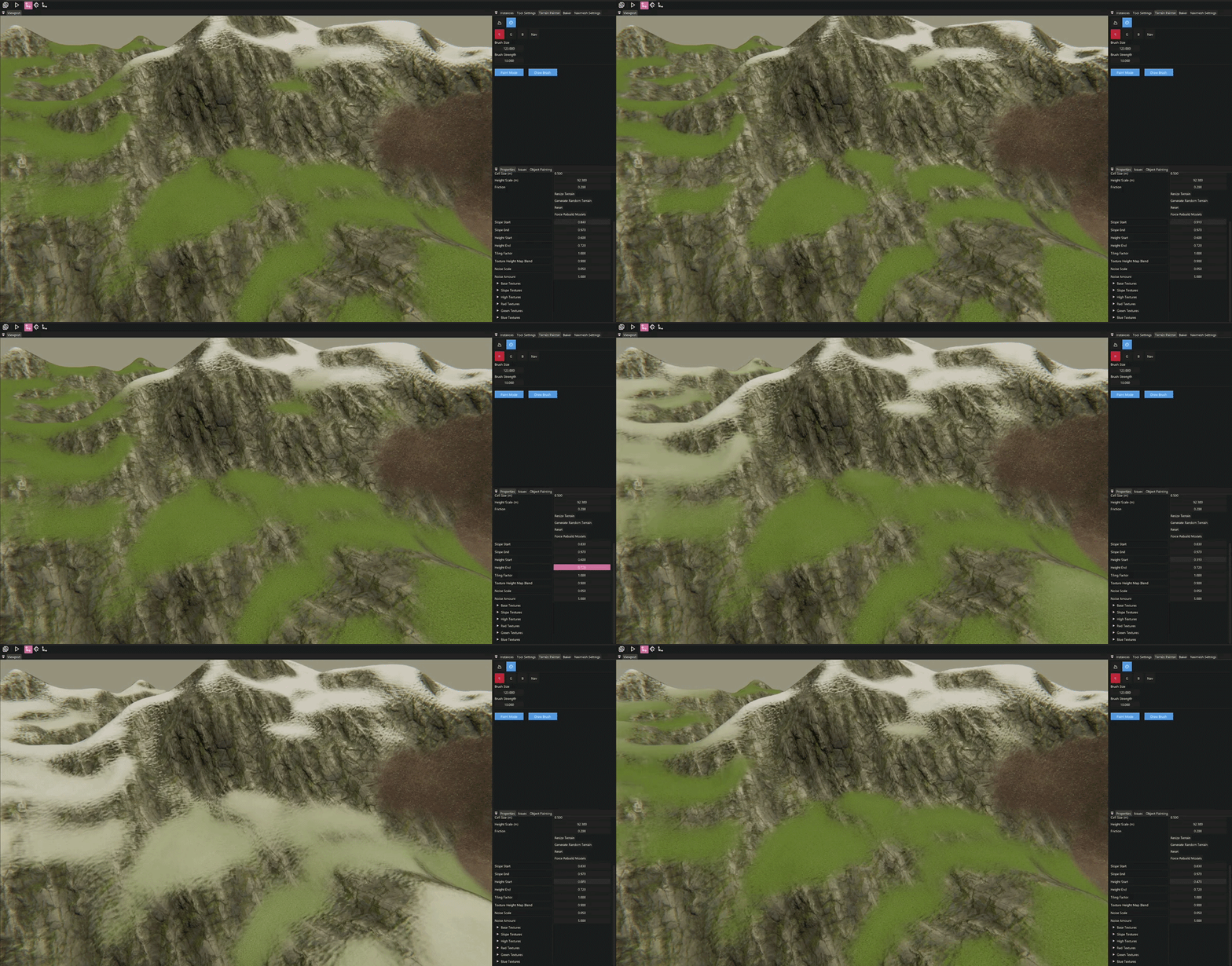
Another useful feature is automatic terrain texturing based on height and slope.
This allows the terrain to look convincing without requiring manual vertex painting everywhere.
Example parameters:
struct Terrain
{
    ...
    float slopeStart{ 0.3f };
	float slopeEnd{ 0.7f };
	float heightStart{ 0.8f };
	float heightEnd{ 1.f };
};
These values are passed to the shader to blend between three materials:
- base terrain
- steep slopes (e.g., rock)
- high altitude terrain (e.g., snow)
Example shader logic:
GBufferOutput main(ModelVertexToPixel input)
{
    float3 localPos = mul(InverseObjectToWorld, input.worldPosition).xyz;

    float slopeMask  = 1.0f - smoothstep(SlopeStart, SlopeEnd, input.normal.y);
    float heightMask = smoothstep(HeightStart, HeightEnd, localPos.y);

    float4 heightBlendAlbedo = lerp(baseAlbedoSample, highAlbedoSample, heightMask);
    float3 heightBlendNormal = lerp(baseNormalSample, highNormalSample, heightMask);
    float4 heightBlendMaterial = lerp(baseMaterialSample, highMaterialSample, heightMask);
    float4 heightBlendFx = lerp(baseFxSample, highFxSample, heightMask);

    float4 blendedAlbedo = lerp(heightBlendAlbedo, slopeAlbedoSample, slopeMask);
    float3 blendedNormal = lerp(heightBlendNormal, slopeNormalSample, slopeMask);
    float4 blendedMaterial = lerp(heightBlendMaterial, slopeMaterialSample, slopeMask);
    float4 blendedFx = lerp(heightBlendFx, slopeFxSample, slopeMask);
}
Reflection
This tool ended up being very useful for the team. Our Level Designers and Graphical Artists were able to iterate much faster and quickly build good-looking environments directly inside the editor.
For me personally, this project was a great learning experience. It helped me better understand how editor tools should be structured and how important systems like history management are implemented.
One downside of the implementation is that the TerrainPainter class became quite chaotic over time. It is implemented as a static class, which I’m generally not a big fan of. However, given the architecture of our editor at the time, it was the simplest solution without requiring major refactoring of more fundamental systems.
If I were to implement this system again, I would likely focus more on tool modularity from the start.