GitHub: Code Samples / Material-PBR
Previous System
After the fourth game project at The Game Assembly, students are grouped together to form a team that develops three games using a custom engine. Each group is expected to expand and improve the engine over time.
One major limitation in our engine and editor was the lack of a proper Material system.
Even though the renderer already supported Physically Based Rendering (PBR), there was no abstraction for materials. Instead, artists had to manually assign:
- Albedo texture
- Normal map
- Material texture (Roughness / Metalness / AO)
- FX texture (Emissive)
…for every single object.
This created several problems:
- Slow workflow when many objects share the same look
- High risk of human error (missing textures)
- No centralized way to tweak appearance
Halfway through the fifth project, this became very noticeable, many objects were missing normal and material textures entirely.
To make this visible, I implemented an error shader that caused objects with missing textures to blink aggressively.
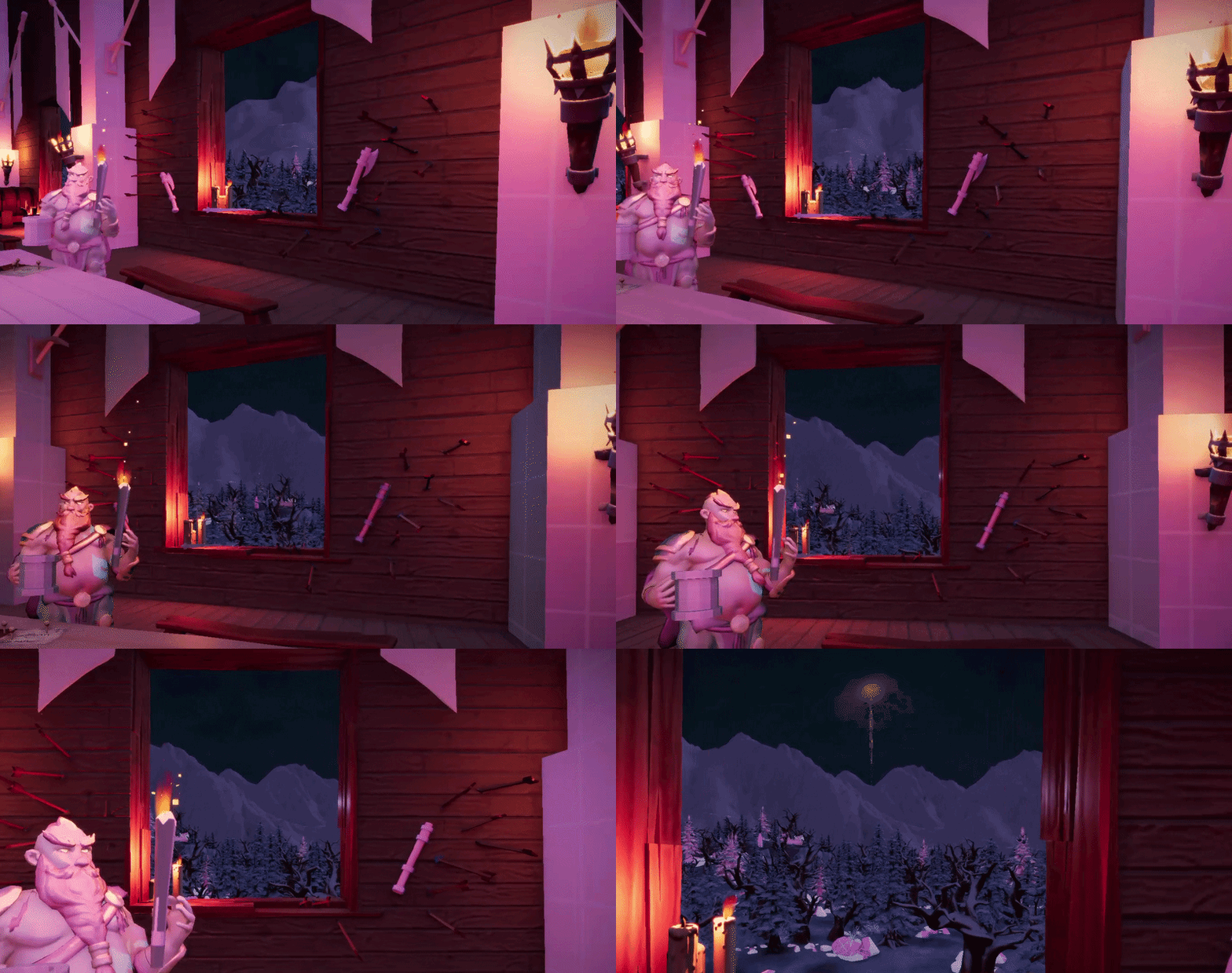
While effective, this was only a symptom of a deeper issue.
Moving to a Material System
For the sixth project, I decided to introduce a proper Material-based workflow.
The goal was not only to simplify texture assignment but also to:
- Enable reusability
- Centralize rendering configuration
- Give artists more flexibility and control
Previously, several rendering settings were hardcoded per render pass or shader:
- Rasterizer state
- Sampler settings
- UV tiling
- Alpha clipping
- Threshold values
With a Material system, these could instead be defined per material, making the system far more flexible.
Another important goal was to support texture-less workflows.
Instead of requiring textures, artists should be able to define materials using:
- Colors
- Scalar values (roughness, metalness, emissive, etc.)
This is especially useful for:
- Prototyping
- Stylized assets
- Debug rendering
Defining a Material
A key requirement was that a material should work differently depending on what is assigned (textures, scalars).
To support this, the shader needs to know what data is available. This is handled using a set of bit flags.
enum class MaterialFlags : uint32_t
{
    None          = 0,

    // Textures
    HasAlbedo     = 1 << 0,
    HasNormal     = 1 << 1,
    HasMaterial   = 1 << 2,
    HasFX         = 1 << 3,

    // Scalars
    HasRoughness  = 1 << 4,
    HasMetalness  = 1 << 5,
    HasAO         = 1 << 6,
    HasDetailMask = 1 << 7,
    HasEmissive   = 1 << 8,

    UseBaseColorTint  = 1 << 9,
    AffectedByLights  = 1 << 10,
};
The material structure then combines:
- Optional textures
- Scalar overrides
- Rendering states
struct Material
{
    std::shared_ptr<InstancedModelShader> customShader;

    std::shared_ptr<Texture> albedo;
    std::shared_ptr<Texture> normal;
    std::shared_ptr<Texture> material;
    std::shared_ptr<Texture> fx;

    Color baseColorTint{ 1.f, 1.f, 1.f, 1.f };

    float roughness{ 1.0f };
    float metalness{ 1.0f };
    float ao{ 1.0f };
    float detailMask{ 1.0f };

    float emissive{ 1.0f };

    MaterialFlags flags{ MaterialFlags::None };

    float normalStrength{ 1.f };
    float alphaThreshold{ 0.01f };
    Vector2f uvScale{ 1.0f, 1.0f };
    Vector2f customParameters;

    BlendState blendState;
    RasterizerState rasterState;
    SamplerFilter samplerFilter;
    SamplerAddressMode samplerAddressMode;

    bool castsShadows{ true };
    bool alphaClipOpaque{ false };
};
This allows materials to be:
- Fully texture-based
- Fully procedural
- Or a hybrid of both
Rendering
In a deferred renderer, opaque objects typically go through three passes:
- Depth pass
- Shadow pass
- Opaque (G-buffer) pass
Each pass requires slightly different state configuration.
Depth & Shadow Binding
void BindDepth(const Material* aMat, GraphicsStateStack& aGfx)
{
    aGfx.SetBlendState(aMat->blendState);
    aGfx.SetRasterizerState(aMat->rasterState);

    if (aMat->alphaClipOpaque && aMat->albedo)
    {
        ID3D11ShaderResourceView* resourceViews{ aMat->albedo->GetSRV() };
        DX11::Context->PSSetShaderResources(1, 1, &resourceViews);
        SetMaterialBuffer(aMat);
    }
}

void BindShadow(const Material* aMat, GraphicsStateStack& aGfx)
{
    aGfx.SetBlendState(aMat->blendState);
    if (aMat->rasterState == RasterizerState::BackfaceCulling)
    {
        aGfx.SetRasterizerState(RasterizerState::BiasedBackFaceCulling);
    }
    else if (aMat->rasterState == RasterizerState::FrontfaceCulling)
    {
        aGfx.SetRasterizerState(RasterizerState::BiasedFrontFaceCulling);
    }
    else
    {
        aGfx.SetRasterizerState(RasterizerState::BiasedNoFaceCulling);
    }

    if (aMat->alphaClipOpaque && aMat->albedo)
    {
        ID3D11ShaderResourceView* resourceViews{ aMat->albedo->GetSRV() };
        DX11::Context->PSSetShaderResources(1, 1, &resourceViews);
        SetMaterialBuffer(aMat);
    }
}
For shadow rendering, I use biased rasterizer states to take advantage of slope-scaled depth bias in DirectX 11. This helps reduce shadow acne.
If artists want the material to discard based on an albedo texture we also have to bind it and make sure we render using a pixel shader instead of only rendering with a vertex shader.
Main Material Binding
void BindMaterial(const Material* aMat, GraphicsStateStack& aGfx)
{
    aGfx.SetBlendState(aMat->blendState);
    aGfx.SetRasterizerState(aMat->rasterState);
    aGfx.SetSamplerState(aMat->samplerFilter, aMat->samplerAddressMode);

    ID3D11ShaderResourceView* resourceViews[4]{ nullptr, nullptr, nullptr, nullptr };
    if (aMat->albedo)
    {
        resourceViews[0] = aMat->albedo->GetSRV();
    }
    if (aMat->normal)
    {
        resourceViews[1] = aMat->normal->GetSRV();
    }
    if (aMat->material)
    {
        resourceViews[2] = aMat->material->GetSRV();
    }
    if (aMat->fx)
    {
        resourceViews[3] = aMat->fx->GetSRV();
    }
    DX11::Context->PSSetShaderResources(1, 4, resourceViews);

    SetMaterialBuffer(aMat);
}
This function:
- Binds textures (if present)
- Sets states
- Uploads material data to the GPU
Material Buffer
All per-material data is packed into a constant buffer, this includes:
- Scalar values
- Flags
- UV scaling
- Custom parameters
void SetMaterialBuffer(const Material* aMaterial)
{
    EnsureMaterialBuffer();
    if (locMaterialBuffer == nullptr)
    {
        return;
    }

    ID3D11Buffer* buffer{ locMaterialBuffer.Get() };
    D3D11_MAPPED_SUBRESOURCE mappedObj{};
    if (SUCCEEDED(DX11::Context->Map(buffer, 0, D3D11_MAP_WRITE_DISCARD, 0, &mappedObj)))
    {
        MaterialBuffer* data{ static_cast<MaterialBuffer*>(mappedObj.pData) };
        data->colorTint = aMaterial->baseColorTint.AsLinearVec4();
        data->roughness = aMaterial->roughness;
        data->metalness = aMaterial->metalness;
        data->ao = aMaterial->ao;
        data->detailMask = aMaterial->detailMask;
        data->emissive = aMaterial->emissive;
        data->normalStrength = aMaterial->normalStrength;
        data->alphaThreshold = aMaterial->alphaThreshold;
        data->flags = static_cast<uint32_t>(aMaterial->flags);
        data->uvScale = aMaterial->uvScale;
        data->customParameters = aMaterial->customParameters
        DX11::Context->Unmap(buffer, 0);
    }

    DX11::Context->PSSetConstantBuffers(12, 1, &buffer);
}
Shader Selection
To keep the system flexible, I introduced a simple Shader Library.
Each render pass selects a shader depending on:
- Pass type
- Material properties (e.g., alpha clipping)
const InstancedModelShader* ShaderLibrary::GetShader(ShaderPass aPass, const Material* aMaterial) const
{
    if (aMaterial->customShader != nullptr)
    {
        return aMaterial->customShader.get();
    }

    const ShaderSet& set{ myPassShaders[static_cast<size_t>(aPass)] };

    if (aPass == ShaderPass::Transparent)
    {
        return set.forwardShader;
    }

    if (aMaterial->alphaClipOpaque && (set.deferredAlphaShader != nullptr))
    {
        return set.deferredAlphaShader;
    }

    return set.deferredShader;
}
This allows:
- Default shaders for most materials
- Custom shaders when needed
Shader Design
The shader is built around branching functions that interpret the material flags.
Instead of directly sampling textures, the shader uses helper functions:
- GetAlbedo
- GetNormal
- GetMaterial
- GetFX
Example:
float4 GetAlbedo(float2 scaledUV)
{
    float4 albedo = float4(1.0f, 1.0f, 1.0f, 1.f);
    bool hasAlbedoTex = (MatFlags & HasAlbedo) != 0;

    if (hasAlbedoTex)
    {
        albedo = albedoTexture.Sample(defaultSampler, scaledUV);
    }

    if ((MatFlags & UseBaseColorTint) != 0 && hasAlbedoTex)
    {
        bool hasFXTex = (MatFlags & HasFX) != 0;
        if (hasFXTex)
        {
            float fxMask = fxTexture.Sample(defaultSampler, scaledUV).b;
            float3 tinted = albedo.rgb * MatColorTint.rgb;
            // Apply tint only where FX blue channel > 0
            albedo.rgb = lerp(albedo.rgb, tinted, fxMask);
        }
        else
        {
            albedo *= float4(MatColorTint.rgb, 1.f);
        }
    }
    else if (!hasAlbedoTex)
    {
        albedo = float4(MatColorTint.rgb, 1.f);
    }

    return albedo;
}
Important Behavior
Some notable design decisions:- If no albedo texture exists → use color tint directly
- If texture exists → tint acts as a modifier
- Material scalars behave differently depending on artist needs
- FX textures can mask where tint is applied
This behavior was created through discussion with graphical artists, ensuring it matched their needs.
Deferred Shader Integration
The main shader becomes much cleaner:
GBufferOutput main(ModelVertexToPixel input)
{
    float2 scaledUV = input.texCoord0 * MatUVScale;

    float4 albedo = GetAlbedo(scaledUV);
    if (albedo.a < MatAlphaThreshold)
    {
		discard;
	}

    if ((RenderFlags & RENDER_TEXEL) != 0 && (MatFlags & HasAlbedo) != 0)
    {
        albedo = float4(TexelDensityDebug(scaledUV, albedoTexture, input.worldPosition), 1.f);
    }

    float3 normal = GetNormal(scaledUV);
    float4 material = GetMaterial(scaledUV);
    float4 fx = GetFX(scaledUV);

    // Mask for detail normal in alpha channel of material texture
    normal = GetBlendedDetailNormal(normal, input.texCoord0, material.a);

	float3x3 TBN = float3x3(
		normalize(input.tangent.xyz),
		normalize(-input.binormal.xyz),
		normalize(input.normal.xyz)
	);
	TBN = transpose(TBN);

	float3 pixelNormal = normalize(mul(TBN, normal));
    pixelNormal *= MatNormalStrength;

	float4 currClip = input.currentPos;
	float4 prevClip = input.previousPos;

	float2 currNDC = currClip.xy / currClip.w;
	float2 prevNDC = prevClip.xy / prevClip.w;

	float2 velocity = (currNDC - Jitter) - (prevNDC - PreviousJitter);

	GBufferOutput output;
	output.worldPosition = input.worldPosition;
	output.albedo = float4(albedo.rgb, 1.0f);
	output.normal = float4(0.5f + 0.5f*pixelNormal, 1.0f);
	output.material = material;
	output.fx = fx;
	output.vertexNormal = float4(0.5f + 0.5f*input.normal.xyz, 1.0f);
	output.velocity = float4(velocity, 0, 0);
	output.misc = uint4(input.entityId, input.isDynamic, input.isSelected, 0);
	return output;
}
Editing
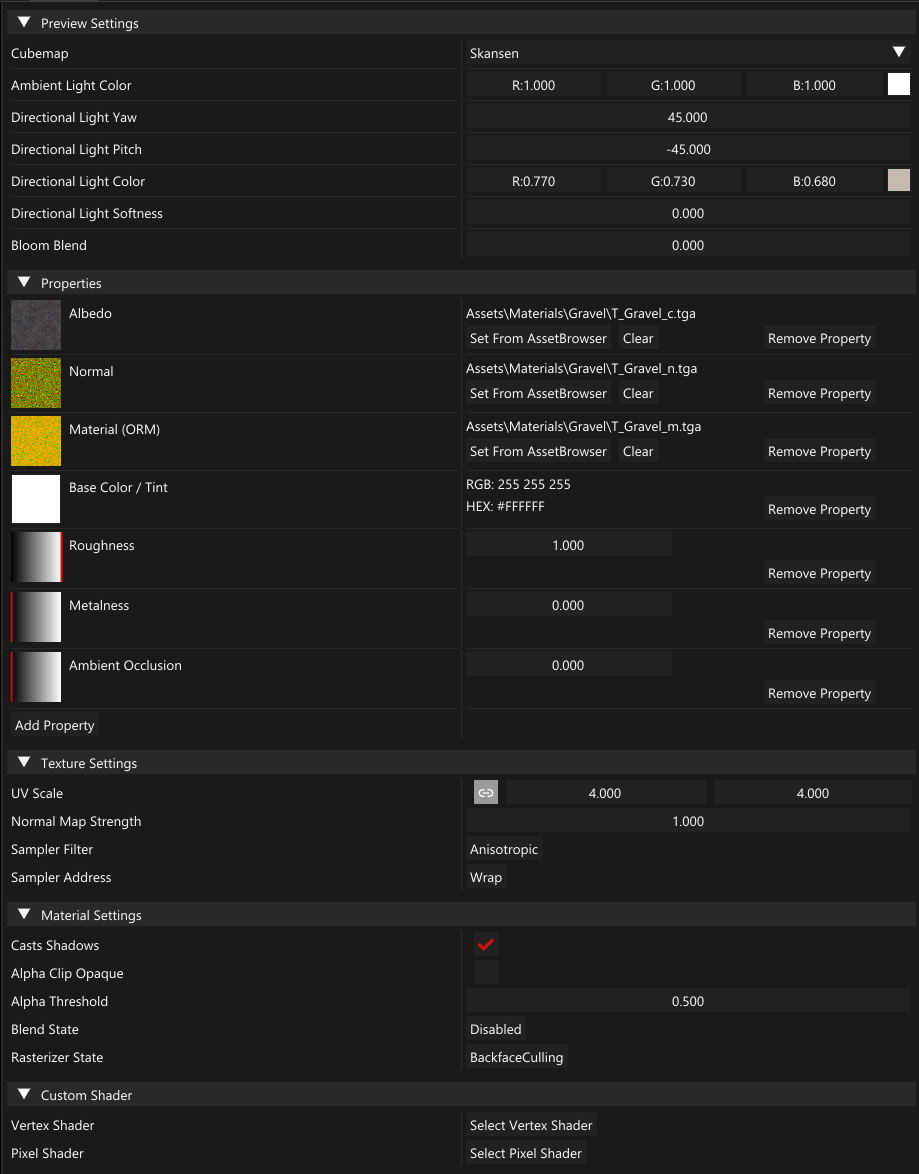
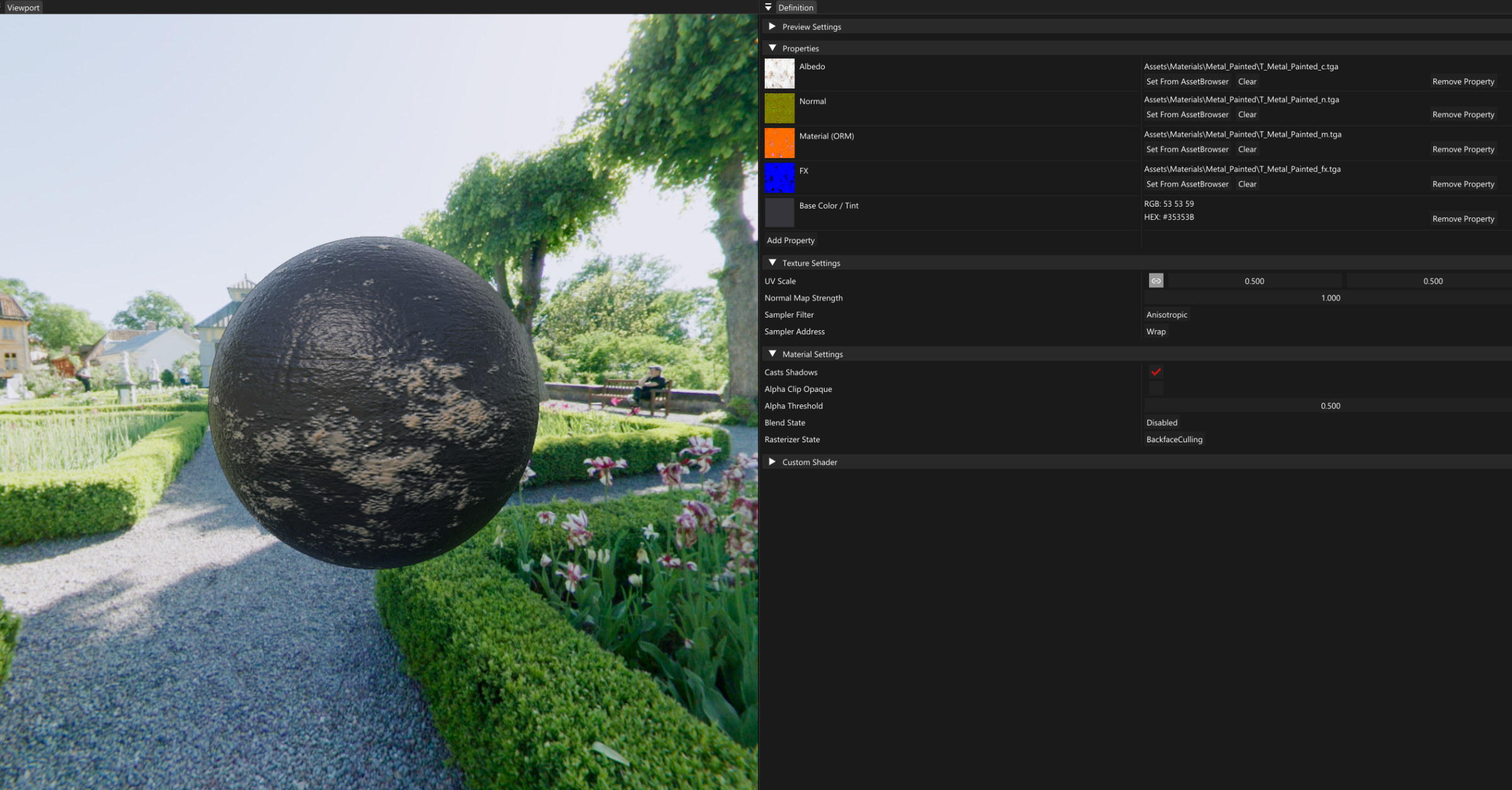
To support the system, a dedicated Material Editor was implemented using ImGui.
Instead of presenting a fixed set of parameters, the editor starts empty and allows users to dynamically add and configure properties.
The editor supports:
- Assigning and previewing textures
- Adjusting scalar values (roughness, metalness, emissive, etc.)
- Configuring rendering states (tiling, sampling, alpha clipping, etc.)
- Switching cubemaps and lighting conditions
- Real-time material updates while editing
All changes are reflected immediately in the renderer, which makes it easy to fine-tune materials without needing to recompile or reload assets.
I chose not to implement a full node-based material graph.
While node-based systems are very powerful, they also introduce significant complexity. Tools like Substance Painter and other industry-standard software already provide advanced workflows, and replicating that level of functionality would have been both time-consuming and unnecessary for the scope of our engine.
Instead, the focus was on:
- Simplicity
- Fast iteration
- Practical usability within the engine
Reflection
Introducing a Material system had an immediate impact on the workflow.
Materials quickly became reusable assets, allowing:
- Faster iteration
- Instant updates across multiple objects
From an engineering perspective, the rendering pipeline became:
- Cleaner
- More modular
- More extensible
Overall, this change significantly improved both the usability of the engine and the efficiency of the team.
Screenshots
Below are a two materials created using the system.
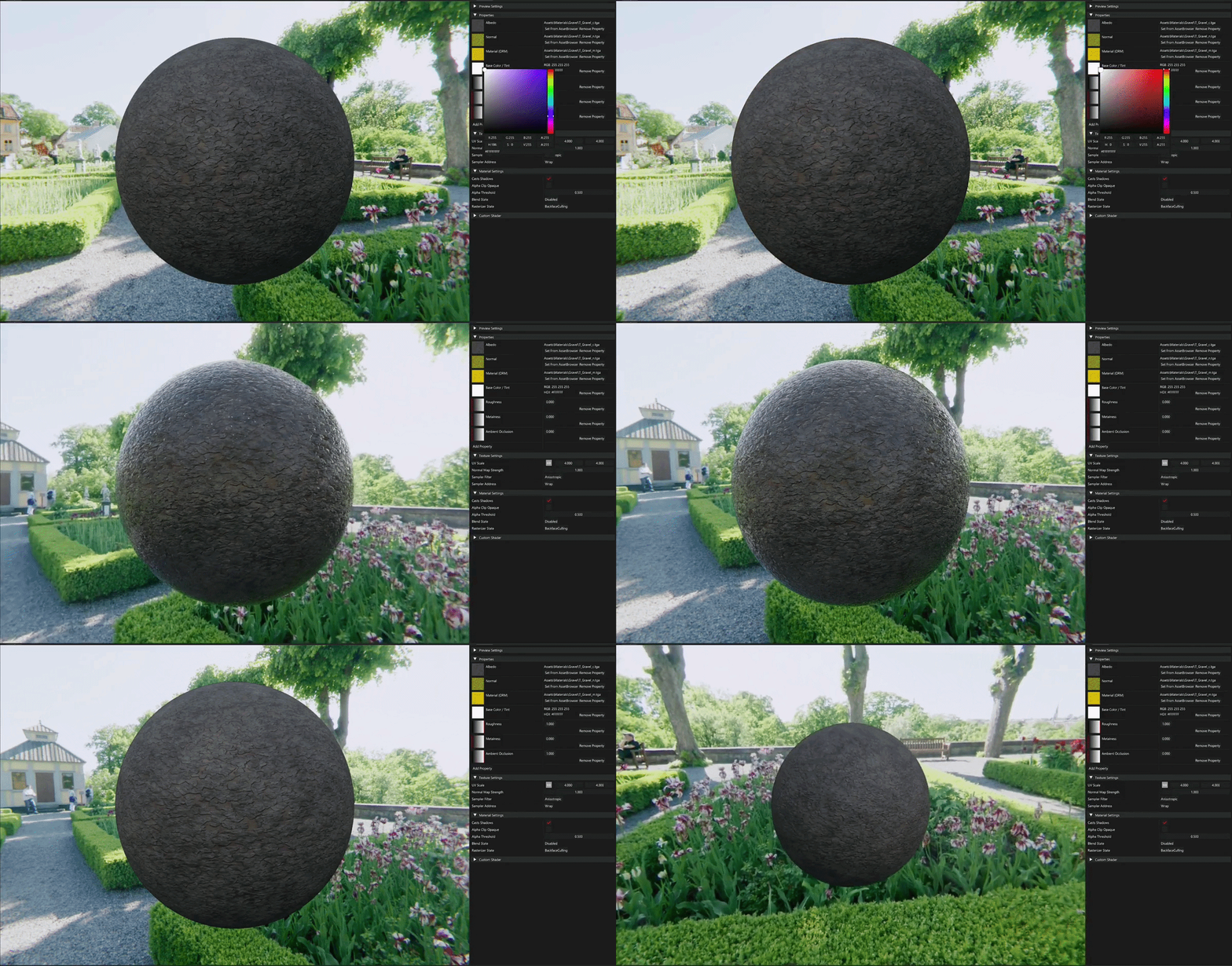
Painted Metal — a standard PBR material using albedo, normal, and material maps.
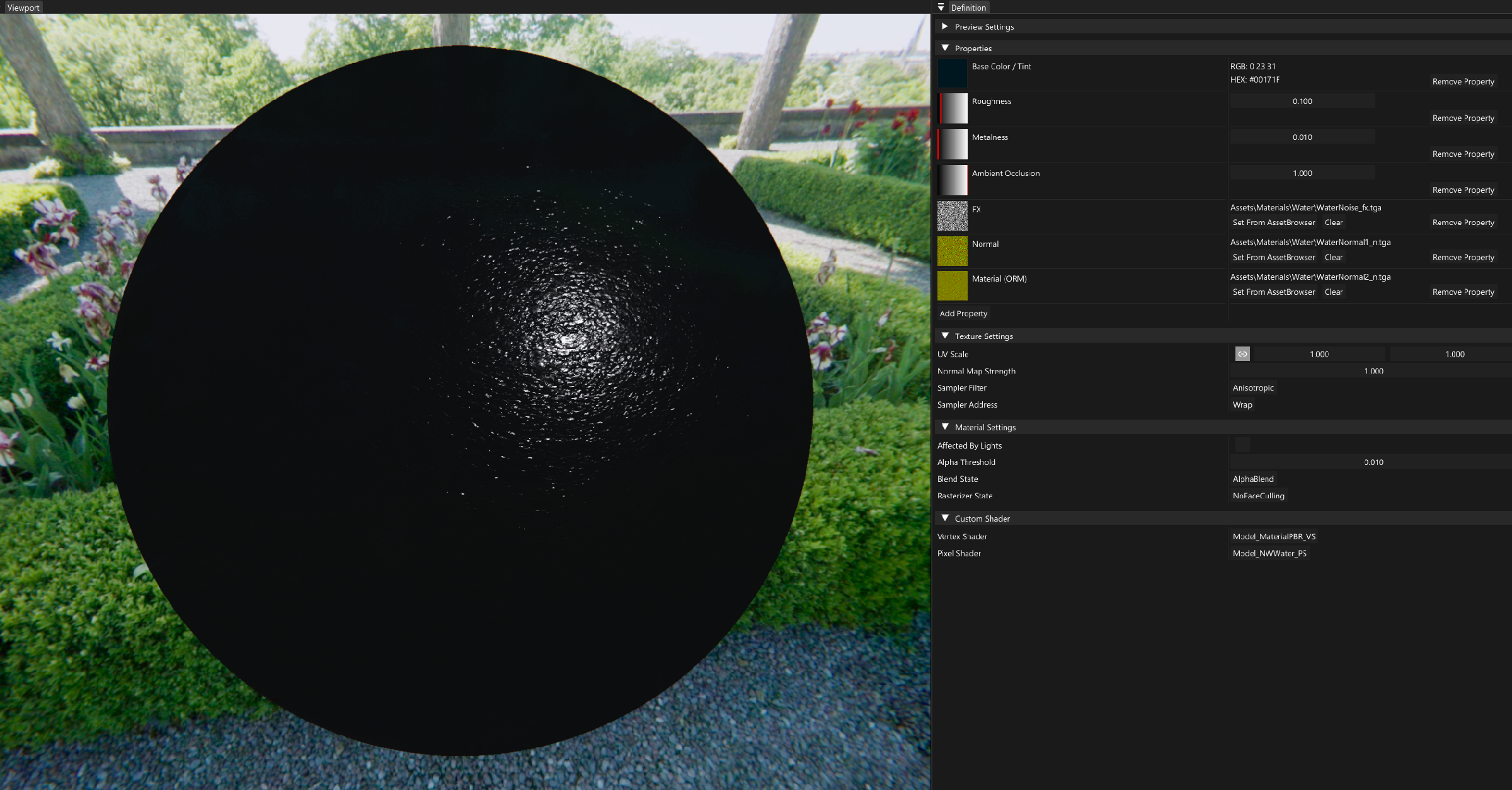
Water — combines textures, scalar parameters, and color tinting.