GitHub: Code Samples / Issue-System
Bugs, Suggestions, and Lost Ideas
In game development, larger problems are usually tracked in tools like YouTrack, Jira, or spreadsheets. Smaller issues—minor bugs, adjustments to environment details, or UX tweaks—tend to get lost. Notes like “this corner needs more grass”, “this jump feels off”, or “the navmesh is broken here” are easy to overlook, yet they affect the final polish.
In game development, larger problems are usually tracked using tools like YouTrack, Jira, or spreadsheets. Smaller issues—minor bugs, environment tweaks, or UX adjustments—often fall through the cracks.
Notes such as:
- “This corner needs more grass”
- “This jump feels slightly off”
- “The navmesh is broken here”
are easy to forget, yet these details are often what separate a good game from a polished one.
To solve this problem, I developed an Issue System that allows developers to track problems and ideas directly inside the game engine.
Instead of writing notes elsewhere, issues can be placed directly in the world, exactly where the problem occurs.
What the Issue System Does
The Issue system allows developers to create and track issues directly inside both the game world and the editor.
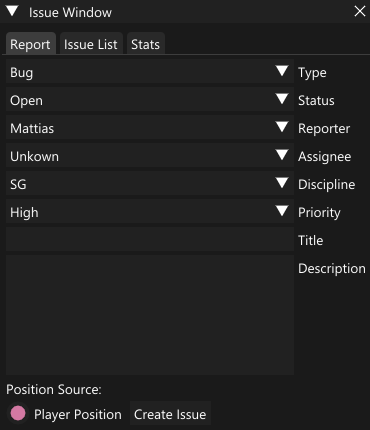
When a developer notices a problem or has an idea, they can place a marker in the scene. These markers appear as sprites in the world and can be inspected or edited through an ImGui debugging window.
This approach has a few advantages:
- Issues are tied to an exact location in the scene
- Creating issues is extremely fast
- Even small suggestions are captured
- Context is never lost
Over time, these small reports accumulate and help push the game toward a much more polished final state.
Defining an Issue
At its core, an issue is simply a small data object that represents a problem, suggestion, or task.
It contains enough information to understand the issue, locate it, and track its progress.
A Issue structure could look like this:
struct Issue
{
    int id;
    IssueType type;       // Bug, Crash, Audio, Graphics, or Suggestion
    IssueStatus status;   // Open, InProgress, Resolved, Closed
    Priority priority;    // High, Medium, Low

    std::string scene;
    std::string title;
    std::string description;

    Vector3f position;
};
Extending Issue Data
The system is designed to be flexible. Additional metadata can easily be included.
For example, issues may reference external resources or screenshots:
struct Issue
{
    ...
    std::string externalLink;
    std::vector<std::string> screenshots;
};
Tracking personnel and timestamps adds accountability and improves collaboration:
struct Issue
{
    ...
    Personnel reporter;
    Personnel assignee;
    std::string createdTime;
    std::string editedTime;
    Personnel lastEditor;
};
Note: Using enums for personnel works for small teams, but becomes harder to manage as the team grows. A more flexible system (such as user IDs) is usually preferable in larger projects.
Creating and Storing Issues
The initial implementation stored issues as JSON files.
For small teams, this approach works surprisingly well:
- Easy to implement
- Human-readable
- No server infrastructure required
Each issue is simply serialized and saved to disk.
Handling Issue IDs
One challenge with file-based storage is ID collisions.
If two developers create issues independently, they might generate the same ID. To solve this, issue IDs are recalculated at runtime based on their creation time.
When all issues are loaded, they are sorted by timestamp and assigned sequential IDs.
void IssueHandler::LoadAll()
{
    myIssues.clear();

    for (const auto& entry : fs::directory_iterator(myFolder))
    {
        if (entry.path().extension() == ".json")
        {
            std::ifstream file(entry.path());
            if (file.is_open())
            {
                json j;
                file >> j;
                Issue i = j.get<Issue>();
                myIssues.push_back(i);
            }
        }
    }

    std::ranges::sort(myIssues, [](const Issue& aA, const Issue& aB)
    {
        return aA.createdTime < aB.createdTime;
    });

    int nextId{ 1 };
    for (auto& issue : myIssues)
    {
        issue.id = nextId++;
    }

    myNextId = nextId;
}
To further avoid conflicts, issue files themselves are named using their creation timestamp.
void IssueHandler::Save(const Issue& aIssue) const
{
    std::string safeTimestamp{ aIssue.createdTime };
    std::ranges::replace(safeTimestamp, ':', '-');

    const std::string path{ myFolder + "/Issue_" + safeTimestamp + ".json" };
    std::ofstream file(path);
    if (file.is_open())
    {
        const json j = aIssue;
        file << j.dump(4);
        file.close();
    }
}
Adding Issues
Creating an issue is intentionally simple.
A timestamp is generated, the issue is stored locally, and it becomes immediately available to be rendered as a sprite.
Issue& IssueHandler::AddIssue(const Issue& aIssue)
{
    Issue newIssue{ aIssue };
    newIssue.id = myNextId++;

    const std::time_t t{ std::time(nullptr) };
    const std::tm tm{ *std::localtime(&t) };
    char buffer[20];
    std::strftime(buffer, sizeof(buffer), "%Y-%m-%dT%H:%M:%S", &tm);
    newIssue.createdTime = buffer;

    myIssues.push_back(newIssue);
    Save(newIssue);

    return myIssues.back();
}
Scaling to a Database
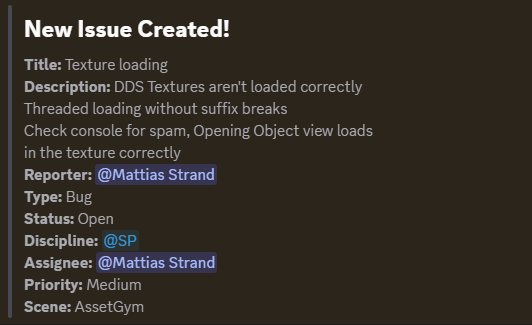
As the system evolved, I added Discord notifications for issue creation and edits. This quickly made the system more engaging—developers started fixing issues as soon as they appeared.
However, it also exposed a synchronization problem.
Sometimes an issue would be reported on Discord before the JSON file had been pushed to version control, leading developers to chase problems that weren’t yet synced locally.
To solve this, I migrated the system to a database-backed solution using Supabase.
With a centralized backend:
- Issues exist in one shared location
- IDs are generated automatically
- Synchronization problems disappear
The database now returns the issue ID when a new issue is created.
Issue& IssueHandler::AddIssue(const Issue& aIssue)
{
    Issue newIssue{ aIssue };
    const std::time_t t{ std::time(nullptr) };
    const std::tm tm{ *std::localtime(&t) };
    char buffer[20];
    std::strftime(buffer, sizeof(buffer), "%Y-%m-%dT%H:%M:%S", &tm);
    newIssue.createdTime = buffer;

    const int cloudId{ mySupabase.InsertIssue(newIssue) };
    if (cloudId <= 0)
    {
        std::cout << "[IssueHandler] Failed to insert issue to Supabase\n";
    }

    newIssue.id = cloudId;
    const std::lock_guard<std::mutex> lock(myIssuesMutex);
    myIssues.push_back(newIssue);
    return myIssues.back();
}
Synchronizing Issues
To keep the local editor state updated, the system periodically synchronizes with the database.
bool IssueHandler::SyncFromSupabase()
{
    std::vector<Issue> cloudIssues;
    if (!mySupabase.GetAllIssues(cloudIssues))
    {
        std::cout << "[IssueHandler] Failed to fetch issues from Supabase\n";
        return false;
    }
    const std::lock_guard<std::mutex> lock(myIssuesMutex);

    if (myIssues != cloudIssues)
    {
        myIssues = std::move(cloudIssues);
        mySyncChanged = true;
    }
    else
    {
        mySyncChanged = false;
    }
    return true;
}
This ensures that all developers always see the latest set of issues.
Sprites and ImGui
Once the issue has a position and data attached to it, drawing a sprite with some text or metadata becomes fairly trivial, although the exact implementation will depend on the engine.
What matters most is that the issue is visible in the scene.
In fact, it is often beneficial if the sprite is slightly ugly or intrusive. Developers naturally want to remove visual clutter, which means the fastest way to clean up the scene is to fix the issue so the marker disappears.
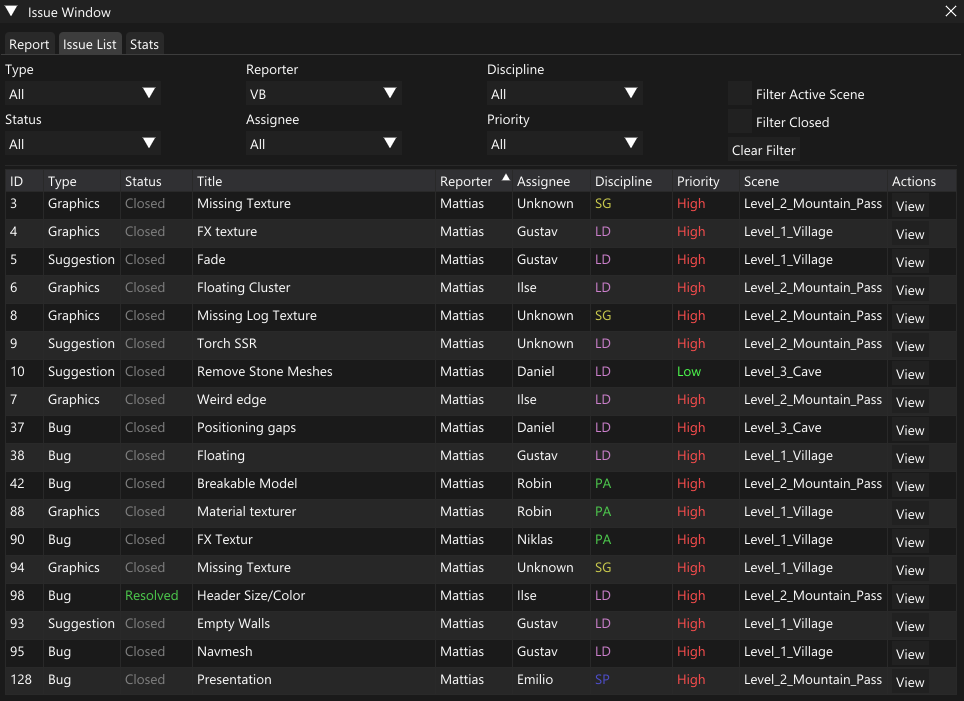
For managing issues globally, an ImGui window provides a simple but powerful interface. Issues can be filtered and sorted by almost any field — status, assignee, reporter, scene, discipline, priority, and more.
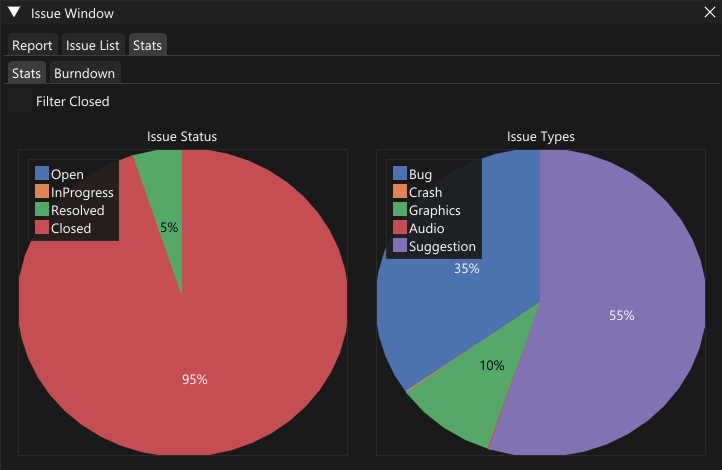
Because all data is already structured, it also becomes easy to generate quick statistics such as:
- issues per scene
- issues per discipline
- open vs resolved issues
- workload per developer